- Status
- Active
- Platform
- iOS
- Publisher
- HELPERG LLC
Focused software with a clear destination
The details on this page are taken from the public App Store listing (checked November 2026). Store listings change, so the store page is the final word on features and prices.
Verified availability
CV Builder has verified active destinations for iOS.
What CV Builder does
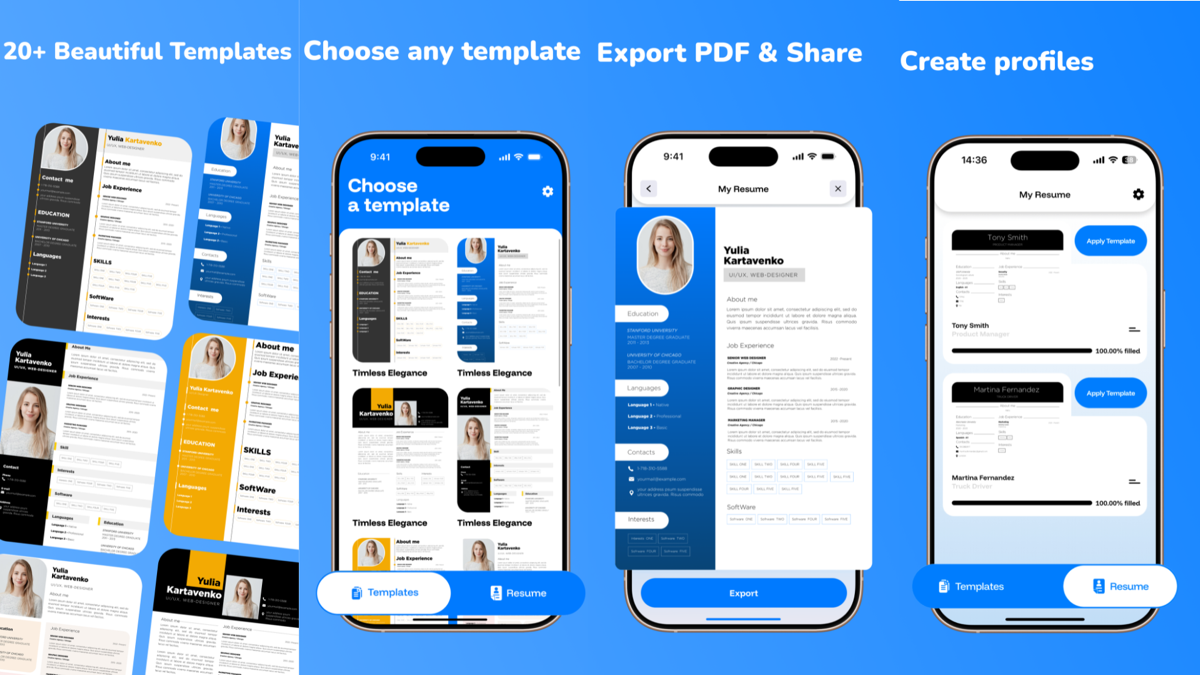
CV Builder turns a phone into a résumé editor. According to its App Store listing it guides you step by step through entering your details, lays them out in one of more than 20 professional templates, and exports the result as a PDF, JPG or PNG to share by email or cloud storage. You can also import an existing résumé to edit it, keep several versions, and write cover letters.
How to make a résumé on your phone
- Start from your details — or import the résumé you already have.
- Pick a template: modern, elegant or classic designs.
- Adjust the look: colours, fonts, spacing and layout.
- Export a PDF and send it, or save JPG and PNG versions for portals that want an image.
Tips that make a résumé work
- One version per kind of job. Keep a separate copy for each role you apply for, with the most relevant experience first.
- Results, not duties: "cut invoice processing time by a third" says more than "responsible for invoices".
- Send PDFs. A PDF keeps the layout exactly as you designed it on every device.
- Name the file clearly —
Firstname-Lastname-CV.pdf— so it is easy to find in a recruiter's inbox.
Need to change a PDF you received or add a signature to a contract after the interview? Use PDF Editor.
For a full walkthrough — structure, result-focused bullets, tracking-system-friendly layouts and tailoring — read how to make a résumé on iPhone.
Availability
- iPhone and iPad: iOS / iPadOS 15.6 or later (App Store category: Business).
- Price: free to download; the premium templates are unlocked with a Pro subscription, priced per country on the store.
- Developer on the App Store: HRHELPERG LLC.
FAQ
Can I make a résumé on my iPhone?
Yes. CV Builder guides you through your details step by step and lays them out in a template, ready to export as a PDF.
Can I edit a résumé I already have?
Yes. The App Store listing says you can import an existing résumé and edit it.
Does it make cover letters?
Yes. You can create several résumé versions and cover letters in the app.
Which file formats can I export?
PDF, JPG and PNG, shared by email or to cloud storage.